
How to Verify Medicare Coverage Online: A Complete Guide for Providers
That “patient not covered” denial is a gut punch. You provided the care, but the claim gets rejected over an eligibility snag you could have caught upfront. It’s a massive time sink and a direct hit to your revenue. We get it. That’s why the How to Verify Medicare Coverage Online process isn’t just administrative busywork—it’s your first and most crucial step toward cleaner claims and faster payments.
This guide cuts through the noise. We’ll walk you through the exact steps to confirm coverage in minutes, not days, so you can stop chasing denials and start getting paid. Think of it as your five-minute shield against financial headaches. Let’s dive in.


Why Medicare Verification is Your First Line of Defense Against Claim Denials
Let’s be clear: a front desk verification check isn’t a clerical task. It’s a core revenue cycle function. Think of it as the castle gate—if it’s left unguarded, denials storm in.
Consider this: industry data suggests a staggering number of claim denials—some reports indicate up to 30%—stem from simple eligibility or coverage issues. Each one of those denials costs your practice real money and staff time in rework, appeals, and delayed cash flow. That’s a financial bleed that’s entirely preventable.
This is where AdvancedMD Medical Billing, a Reliable Medical Billing and Coding Company, sees practices regain control. By investing two minutes to verify Medicare coverage online before the patient is seen, you’re not just collecting data. You’re building a bulletproof claim from the ground up. You’re confirming active status, catching crucial plan details like Medicare Advantage, and identifying needed authorizations. This proactive step is what separates high-performing practices from those constantly fighting avoidable financial fires. It’s the simplest, most effective way to protect your revenue.
The Critical Importance of Accurate Medicare Verification
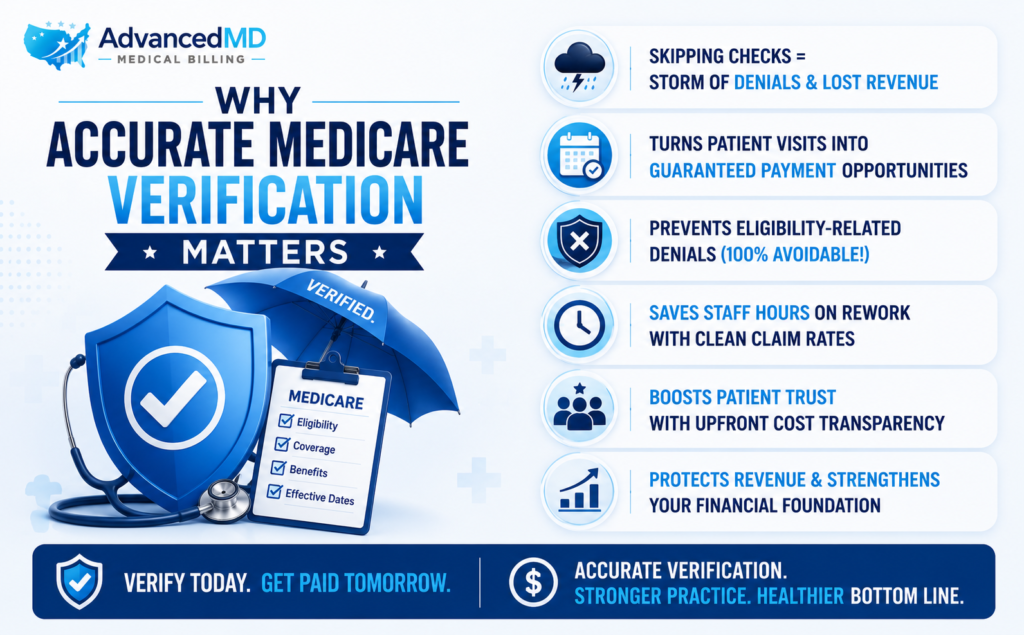
Skipping Medicare verification is like sailing a ship without checking the forecast. It seems fine until you’re in the middle of a storm of denials. This isn’t about paperwork; it’s a fundamental business practice that safeguards your revenue.
Every patient visit starts with a financial promise: that the services you provide will be paid for. Accurate verification is how you ensure that promise is kept. It’s the difference between a clean, paid claim and a frustrating, costly rejection that your staff must spend hours unraveling. When you know how to verify Medicare coverage online thoroughly, you’re not just checking a box. You’re confirming active status, uncovering crucial Medicare Advantage plans, and identifying need for ABNs—all before the patient is in the room.
This proactive mindset is what we at AdvancedMD Medical Billing instill in every client. It transforms your front desk from an administrative stop into your most powerful financial checkpoint.
Reducing Claim Denials and Improving Clean Claim Rates
Here’s the simple truth: most denials for eligibility are 100% preventable. They’re also the most frustrating because the work was done, but the payment vanishes over a simple, checkable detail.
A quick upfront verification is your cure. It catches expired coverage, incorrect plan types, and missing enrollments before they become a problem. This direct action is what shrinks your denial rate and boosts your clean claim percentage dramatically think of it as the one stitch in time that saves nine—or in this case, saves countless hours of rework, so mastering how to verify Medicare coverage online is the ultimate shortcut to a smoother revenue cycle.
Enhancing Patient Satisfaction and Financial Transparency
Nothing sours a patient relationship faster than a surprise bill, that awkward front-desk conversation about an unexpected copay or denied service? It’s often rooted in a missed verification step.
But when your team knows how to verify Medicare coverage online thoroughly, you flip the script. You can confidently discuss costs upfront, explain coverage gaps, and secure necessary ABNs before treatment. This transparency transforms the financial experience. Patients feel informed and respected, not ambushed. It builds immense trust and positions your practice as professional and compassionate, turning a routine check into a powerful tool for patient retention.
Prerequisites for Online Medicare Verification
Let’s be real for a second. The fastest way to waste ten minutes is to log into a government portal without having your numbers ready, we’ve seen it happen too many times, and the goal here is to make this quick and painless, so let’s get your desk set up for success.
Based on handling thousands of these verifications, here’s the short, non-negotiable list you need to have ready. Not kind of ready, but copy-and-paste ready.
For the patient, pull their Medicare card. You need:
- Their full legal name (exactly as it appears on the card—think “William,” not “Bill”).
- Their date of birth.
- Their Medicare Beneficiary Identifier (MBI). This is the mix of letters and numbers on the card. Get this one wrong, and nothing else matters.
For your practice, you need:
- Your provider NPI number.
- A working login for the CMS PECOS system. If you don’t have this, you hit a wall immediately. This isn’t something you can create on the fly; your office manager usually handles the setup.
That’s it. It sounds simple, but in practice, we often see holes in this exact list. Getting it right is what we at AdvancedMD Medical Billing consider the foundation of a clean claim. Miss one, and you’re just creating more work for later.
Step by Step Guide: How to Verify Medicare Coverage Online via PECOS
Let us be straight with you—the first time we logged into PECOS, we stared at the screen for a good five minutes, completely lost. It’s not intuitive. But after years of guiding our team at AdvancedMD Medical Billing through this, we can tell you it gets easier. The key is to take it one click at a time. Don’t rush.
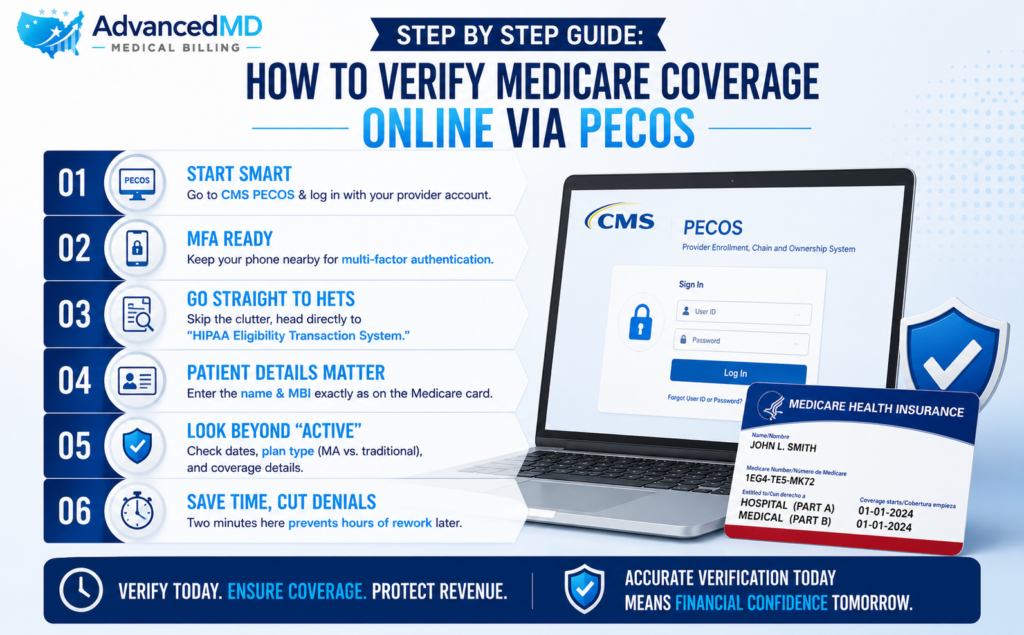
Start by heading to the CMS PECOS website. Use your provider login—the one your office manager set up. If it asks for a multi-factor authentication code, have your phone ready. Once you’re in, ignore all the other menu options for now. Just find and click on “HIPAA Eligibility Transaction System (HETS).” That’s your destination.
Now, the most important part: typing in the patient’s details. This is where you have to slow down. Pull that Medicare card right up on your desk. Type the name exactly as you see it. Is it “Robert” or “Rob”? Use Robert. For the MBI number, read it like a password. Is that a zero or the letter O? A number 1 or a letter I? One wrong character and you’ll get an error, or worse, information for the wrong person. We’ve seen it happen.
Click submit. The system will think for a second. When the results come back, don’t just look for the word “Active.” That’s the rookie mistake. Your real job starts now. Scroll down. Check the effective dates. Is coverage active on the date of service? Look for the plan type. Does it say “MA” anywhere? That means Medicare Advantage, and that changes everything. That right there is the difference between a clean claim and a denial that’ll take your biller an hour to fix.
It feels like a lot, we know. But after your tenth time, you’ll fly through it. And that two-minute investment will feel priceless when you see your denial rate start to drop.
Beyond the Basics: Interpreting Complex Verification Scenarios
You’ve got the basic check down—that’s the easy part. But let’s be real, the basics are just the ticket to the game; they don’t win it. If you’ve been in this business longer than a week, you know the real headaches start when things get messy. The scenarios that don’t have a simple answer are where your revenue is actually on the line. This is where you earn your keep.
Let’s talk about the big one: Medicare Advantage (Part C). You run a verification through the traditional Medicare (PECOS) system and get a green light. You think you’re good to go. But then the claim denies. Why? Because the patient is enrolled in a private Medicare Advantage plan. Their traditional Medicare coverage is effectively “on hold.” Verifying with CMS alone gives you a dangerously incomplete picture. The crucial next step? You must verify their eligibility directly with their specific Medicare Advantage plan using their plan ID number, this dual-check process is non-negotiable, and it’s a common oversight we help our partners at AdvancedMD Medical Billing navigate daily.
Then there’s the stealthier issue: service-specific coverage. A patient can have active Medicare Part B and still have a claim denied. How? Because eligibility doesn’t guarantee that Medicare will pay for the specific procedure you’re performing. They might require prior authorization, or the service might be subject to a National or Local Coverage Determination (NCD/LCD) that restricts its use. The verification response might not shout this at you. You have to know to cross-reference the planned procedure code with those NCDs/LCDs. It’s detective work, but it’s what prevents those infuriating denials that seem to come out of nowhere.
These are the nuances that separate a simple data-entry clerk from a true revenue cycle professional. At AdvancedMD Medical Billing, we don’t just process checks; we train your team to see the story behind the data, catching these complexities before they ever become a problem.
From Verification to Payment: Proactive Denial Prevention Strategies
Let’s cut to the chase: checking a box on eligibility isn’t the goal. Getting paid is. The real value of that quick online check isn’t the data itself—it’s what you do with that data to stop denials before they’re even created. This is where you move from playing defense to running a profitable, efficient offense.
Think of the verification report as your early warning system. It’s flashing signals that, if heeded, completely change the financial outcome of a visit. For instance, that report might show a patient has active Part B but also has a Medicare Advantage plan. The signal? You must bill the private insurer, not Medicare. Ignoring that is an instant, 100% avoidable denial. Acting on it is a clean, fast-paid claim.
Or, the report confirms traditional Medicare but you see they haven’t met their annual deductible yet. That’s your signal to have a compassionate, upfront financial conversation with the patient. You can prepare them for their out-of-pocket responsibility before the service, which dramatically improves collection rates and prevents “sticker shock” that leads to bad debt.
This is the tangible ROI. The two minutes spent verifying Medicare coverage online isn’t a cost; it’s an investment that directly translates into a higher clean claim rate, less staff time wasted on rework, and faster cash flow. It’s the financial foresight that allows you to navigate around obstacles instead of crashing into them.
At AdvancedMD Medical Billing, this proactive mindset is built into everything we do, we help our clients see that data not as a static result, but as a strategic playbook for what to do next, as this shift from reactive problem solving to proactive revenue protection—is how practices truly thrive. It turns your front desk staff into your most valuable financial analysts.
Common Pitfalls to Avoid During the Verification Process
Even with the best intentions, it’s easy to stumble, after years of auditing claims, we see the same simple mistakes derail the process time and again. Here’s your cheat sheet of “gotchas” to watch for.
- Rushing the MBI. That Medicare Beneficiary Identifier is unforgiving. Transposing a letter for a number (like ‘B’ for ‘8’) or missing a single character will give you false information. Slow down and triple-check it.
- Assuming “Active” means “Covered.” This is the biggest heartbreak. Active status doesn’t mean the specific service you’re providing is covered. Always dig deeper into the plan details for any limitations.
- Ignoring the Effective Date. So the patient is active—but are they active on the date of their appointment? Coverage can start or end mid-month. Always confirm the exact dates.
- Stopping at Traditional Medicare. If you see “MA” or “Part C,” stop immediately. You’ve just found a Medicare Advantage plan. Your verification isn’t done; you now need to check eligibility with that private insurer.
Mastering how to verify Medicare coverage online means learning to spot these traps before they become costly denials. A careful, meticulous approach here saves everyone a massive headache later.
Best Practices for a Streamlined Medicare Verification Workflow
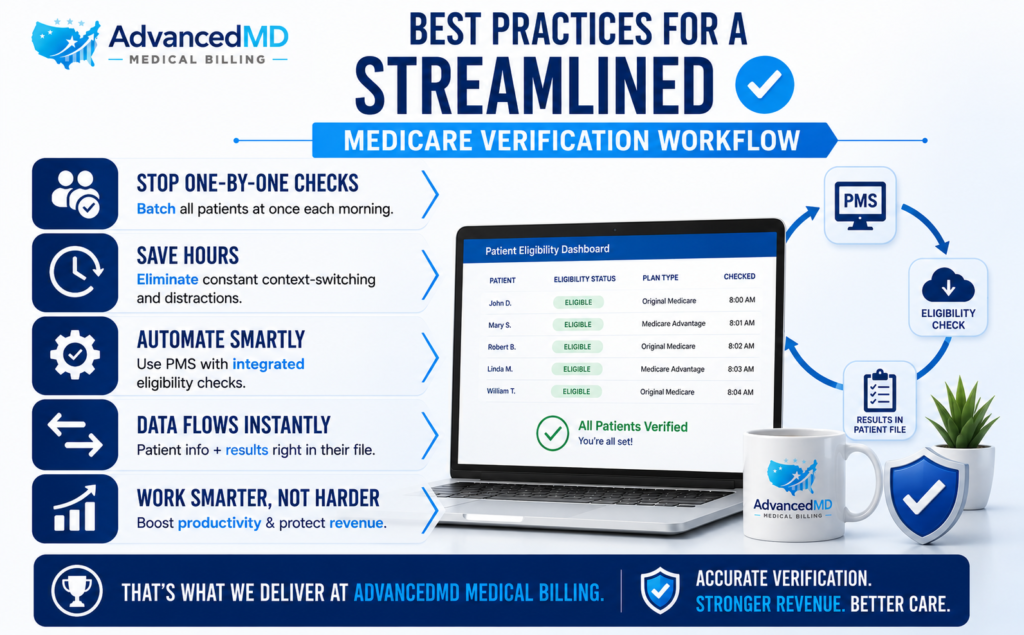
Stop checking eligibility one patient at a time throughout the day. It’s a productivity killer. Instead, batch the process. Designate a specific time each morning to verify coverage for all that day’s patients. This creates a rhythm and minimizes constant context-switching.
If you’re still manually typing data from your practice management system (PMS) into the PECOS portal, you’re working too hard. The gold standard is integrated eligibility checking, where your PMS software automatically pings the verification system in the background. It pulls patient data directly from the appointment schedule and returns the results right into their file. This cuts the process from minutes to seconds.
This level of efficiency is what we help our clients at AdvancedMD Medical Billing achieve. We move practices from reactive, manual checks to a proactive, integrated system that runs like clockwork. It’s about working smarter, not harder, and it’s the best way to protect your revenue without burning out your staff.
Final Thoughts
We need you to see this differently. That five-minute check you might view as a box-ticking exercise? It’s not. It’s the single most effective way to stop revenue from leaking out of your practice before a patient even walks back to the exam room.
Every time you properly verify Medicare coverage online, you’re not just doing admin work. You’re building a claim that gets paid the first time, an saving your billing team from the soul-crushing grind of fighting denials for services you already provided. You’re giving patients clear, upfront answers so they don’t get blindsided by a bill later.
This is the secret that high-performing practices live by. They don’t see this as a cost of doing business; they see it as the foundation of getting paid. It’s the simplest, smartest investment you can make in your financial health.
Stop thinking of it as paperwork. Start treating it like the vital financial safeguard it truly is. Master this, and you stop chasing payments and start collecting them.
Let AdvancedMD Medical Billing Handle the Complexities For You.
We know your focus should be on patients, not portals. But staying on top of every MBI, Medicare Advantage plan, and coverage rule is a massive lift for any practice.
What if you didn’t have to? AdvancedMD Medical Billing acts as an extension of your team, meticulously managing the entire verification process for you. We ensure every eligibility check is accurate, every nuance is caught, and every claim is built on a solid foundation from the start.
You get the peace of mind of clean claims and faster payments, while your staff gets back the time to care for people. Let’s talk about making that a reality.
FAQs
The portal said my patient was “active,” but my claim was denied. Why?
(Ugh, we hate that one.) Here’s the thing: “Active” just means they’re enrolled in Medicare, it doesn’t mean the specific thing you did is covered, it’s like having a driver’s license—it means you can drive, but it doesn’t mean your specific car is insured. The denial probably came from something deeper, like a hidden Medicare Advantage plan or a procedure that needs a prior auth. The status is just the first clue.
What’s the real difference between checking regular Medicare and a Medicare Advantage plan?
This trips everyone up. Think of Traditional Medicare as the main highway. Checking that is straightforward. But a Medicare Advantage plan is like a private toll road that runs parallel to it. If your patient is on that toll road, checking the main highway’s status tells you nothing. You have to exit and check with the toll road’s operator—the private insurance company—directly, it’s an extra step, but it’s the only way to know for sure.
Seriously, how often do I need to do this check?
We get it, it feels repetitive, but you really need to check before every single encounter, a patient’s status isn’t a “set it and forget it” thing. They can switch plans, lose supplemental coverage, or finally meet their deductible overnight. That check you did last month is ancient history. The five minutes you spend is cheaper than the hour your biller will spend fixing a denial.
What’s the one thing that causes the most mess-ups?
It’s always, always the MBI number. That string of letters and numbers on the card is a minefield. Is that a zero or the letter ‘O’? A ‘1’ or an ‘I’? In a hurry, it’s so easy to get wrong. My advice? Keep the physical card right there. Don’t type from a sticky note or a scribbled appointment book. That one slow, careful minute saves a world of pain later.
Is there any way to not drown in this?
Yes, and it’s a game-changer. Look into whether your practice management software can do integrated eligibility checks. Instead of you manually jumping into PECOS, the system can run a batch of checks for all tomorrow’s patients overnight. You walk in the next morning and a report just tells you who’s good to go and who needs a phone call. It takes the weight right off your shoulders.